


Our surname interests database is on hold while we upgrade to our new website
We're in the process of converting surname interests to our new website.
Any previous entries in the Surname Database still exist, but we are preparing this further before you will be able to explore it.
Information about how to enter surname interests
Entry of surname interests is a members-only benefit. The page you are viewing now is a public page.
The Surname Interests database is searchable by any visitor to the IGSI website, whether a member or not. It’s a great introduction to the generous research opportunities available for members of the Irish Genealogical Society International.
Add to the Surname Database
We ask that all members contribute to the database by entering family surnames, Irish location (if known), date of immigration and settlement location. To do this, you will need to LOGIN and enter the information on your Profile Page.
Searching the Surname Interests Database
To search the Surname Database, click on the “Surname Interests” link in the left column to access the search page.
The Surnames listed are those that IGSI members are searching. Please check back regularly to find new additions.
The database as displayed is arranged alphabetically by surname.
- In the Search Surname box, enter the SURNAME you wish to search.
- When the results display, click on the eye in the box on the right of the entry to see the DETAILS entered by the member. These details may include the townland/ parish of the Irish county; Alternate spellings of the surname; additional notes or comments related to the surname or location.
- To contact the IGSI member who entered a surname for further information, click on the envelope image in the box on the right. A new page will open that will ask you to enter your name and email. For validation, you need to check a box and then type in the code that appears.
Add your message and send. While we cannot guarantee a response – nothing ventured, nothing gained.
Adding Your Surnames to the Surname Interests Database
Visit the Profile page. You must be logged in.
Scroll down to the Surname section.
Enter a surname interest
- Click on the “+” below "Surnames." This will open an entry line for your information
- Enter the SURNAME of an ancestor.
- If you know the Irish townland or parish, enter that in the next box.
- In the third box, (heading says “Location in Ireland”) -- enter the IRISH COUNTY of your ancestor. (Do not add word “county”.) If not yet known, leave the box blank.
- In the box marked “Later Residences” indicate the locations to which your ancestors immigrated. If your ancestor settled in one state, enter the abbreviation for that state. If they entered the U.S. on the east coast but moved westward to Minnesota, you can enter the information as NY>IL>MN (no spaces). Please do not include names of cities or counties here.
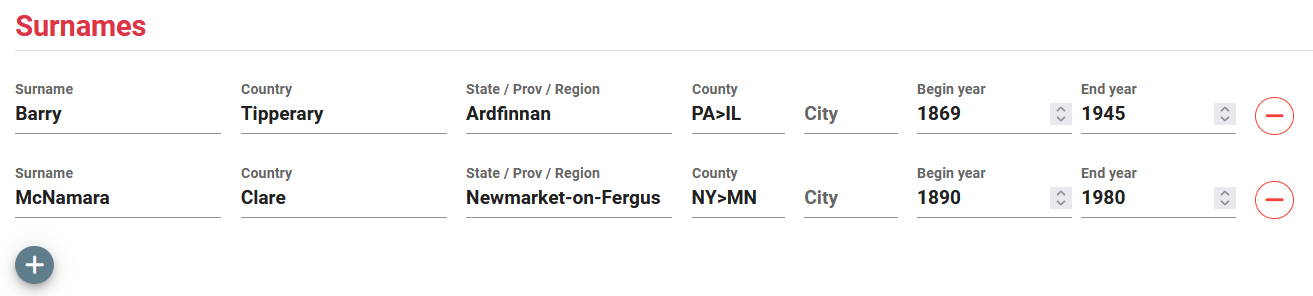
If your ancestors settled in another country (e.g. Canada or Australia), indicate the Province.
Note for all entries
- “Country” will generally be United States, but some members’ ancestors may have settled in Australia or Canada. If your ancestor traveled and lived in another country before arriving at the final destination, so indicate. E.g., Canada > U.S.
- Year of Immigration should be the year the ancestor arrived in the U.S. or final country destination.
- When done, click on the “Save” button in the lower right corner.
To edit your entries
- To edit your entry (e.g., typo correction), click on the text you need to change, and edit the contents. Use the “-” to the right of an entry to delete a Surname and all its information.
- To enter another ancestor’s surname, repeat steps 1-5.